Macros
Macros allow you to change values in the app based on certain conditions.
Theory of operation
A Macro has Triggers and Target Values. The Triggers define when the Macro
should be executed. You can also trigger them manually.
Every trigger can fire either an On or Off value. This gets passed to the Actions.
The Target Values define what parameter(s) should be changed.
Every trigger only executes once per state change. For example:
If the trigger is defined to fire if a fader value is > 0dB it will only fire On
once the value is > 0dB and not for any additional value changes above 0dB.
Once the value is lower than 0dB it will fire Off.
Macros are stored together with the other User Settings.
Usage
- Press the
...menu button in the mixer view - Select
Macros
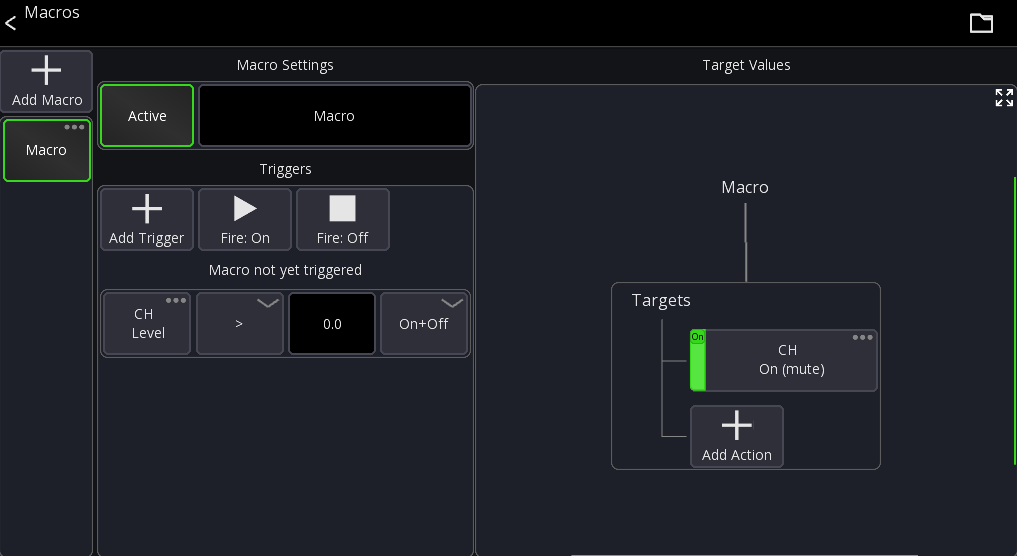
The list on the very left contains all your macros. The screen on the right shows the settings of the currently selected macro.
To delete a macro press and hold the macro button.
Macro Settings
Each macro has a name and an active state (disabled macros do nothing).
Triggers
Automatic Triggers can be added by pressing the Add Trigger button.
To fire a macro manually use the Fire: On and Fire: Off buttons. Alternatively you can also
assign the Macro action to a custom layout or midi device to trigger a macro.
This will add a new trigger to the list. Every trigger has:
- Source value
- Comparator (greater than, less than)
- Threshold value
- Mode
If the source value changes it will be compared using the comparator against the threshold.
For example is source value greater than 0?. The mode defines what should happen
if the condition is met. It can either fire On and Off depending on whether the condition
is met or not. Or it can always fire On if the condition is met, or always Off if the condition is met.
Using multiple triggers the different modes allows you to build more complex behaviors, for example:
- Fire
Onif level > 0 - Fire
Offif level < -20
Target Values
On the right side of the screen you see all target values assigned to the macro.
A target value must be an on/off value, so either simple values like "On/Off" or if you want to change other parameters use the Set Value action.