DiGiCo SD / Quantum
The integration for DiGiCo mixers has some serious limitations due to the incomplete OSC API of the mixer.
If you want to have more features / use Mixing Station properly, please let DiGiCo know about it!
However you can still use Mixing Station to provide personal monitoring mixing using web access!
Configuration
- On the mixer go to
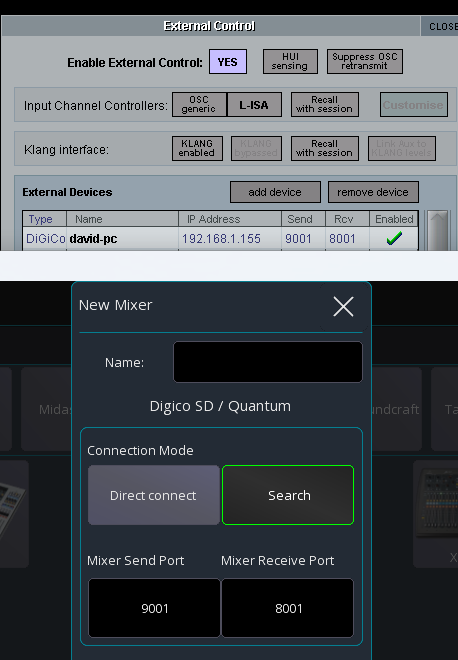
Setup -> External Control - Enable
External Control: Yes - Press
add device->DiGiCo Pad - Enter the IP address of the device running Mixing Station. You can leave the ports default
- Make sure the entry is marked as
Enabled - In Mixing Station enter the same ports as shown on the mixer, see screenshot below as an example
Limitations (due to mixer firmware)
- Only 1 client per mixer
- No metering -> This will be resolved in 3.2.1
- No routing
- On some SD models: No headamp control depending on the input
- Not all channel parameters accessible